Web App Generator

Labels
AI(22) AJAX(112) App Studio(10) Apple(1) Application Builder(245) Application Factory(207) ASP.NET(95) ASP.NET 3.5(45) ASP.NET Code Generator(72) ASP.NET Membership(28) Azure(18) Barcode(2) Barcodes(3) BLOB(18) Business Rules(3) Business Rules/Logic(140) BYOD(13) Caching(2) Calendar(5) Charts(29) Cloud(14) Cloud On Time(2) Cloud On Time for Windows 7(2) Code Generator(54) Collaboration(11) command line(1) Conflict Detection(1) Content Management System(12) COT Tools for Excel(26) CRUD(1) Custom Actions(1) Data Aquarium Framework(122) Data Sheet(9) Data Sources(22) Database Lookups(50) Deployment(22) Designer(178) Device(1) Digital Workforce(3) DotNetNuke(12) EASE(20) Email(6) Features(101) Firebird(1) Form Builder(14) Globalization and Localization(6) HATEOAS(13) How To(1) Hypermedia(3) Inline Editing(1) Installation(5) JavaScript(20) Kiosk(1) Low Code(3) Mac(1) Many-To-Many(4) Maps(6) Master/Detail(36) Micro Ontology(5) Microservices(4) Mobile(63) Mode Builder(3) Model Builder(3) MySQL(10) Native Apps(5) News(18) OAuth(9) OAuth Scopes(1) OAuth2(14) Offline(20) Offline Apps(4) Offline Sync(5) Oracle(11) PKCE(2) Postgre SQL(1) PostgreSQL(2) PWA(2) QR codes(2) Rapid Application Development(5) Reading Pane(2) Release Notes(186) Reports(48) REST(29) RESTful(33) RESTful Workshop(14) RFID tags(1) SaaS(7) Security(81) SharePoint(12) SPA(5) SQL Anywhere(3) SQL Server(26) SSO(1) Stored Procedure(4) Teamwork(15) Tips and Tricks(87) Tools for Excel(3) Touch UI(93) Transactions(5) Tutorials(183) Universal Windows Platform(3) User Interface(337) Video Tutorial(37) Web 2.0(100) Web App Generator(101) Web Application Generator(607) Web Form Builder(40) Web.Config(9) Workflow(28)
Archive
Blog
Web App Generator
Thursday, November 8, 2012PrintSubscribe
Advanced Membership Provider for SQL Server

Requirements

An advanced membership and role provider requires three tables.

One table keeps track of user information. This information includes the UserName, Email, and a Comment. Additional columns allow for implementation of a password question and answer in order to recover a forgotten password. When users are created, they can not be approved by default. Additional information is captured about the most recent login, activity, and change of password. When a user inputs an incorrect password past the limit, the user will become locked out. The number of failed attempts and most recent failed attempt will be stored.

Two tables are required to keep track of roles and associations of users with roles.

These are the advanced membership and role provider tables with “identity” primary keys.
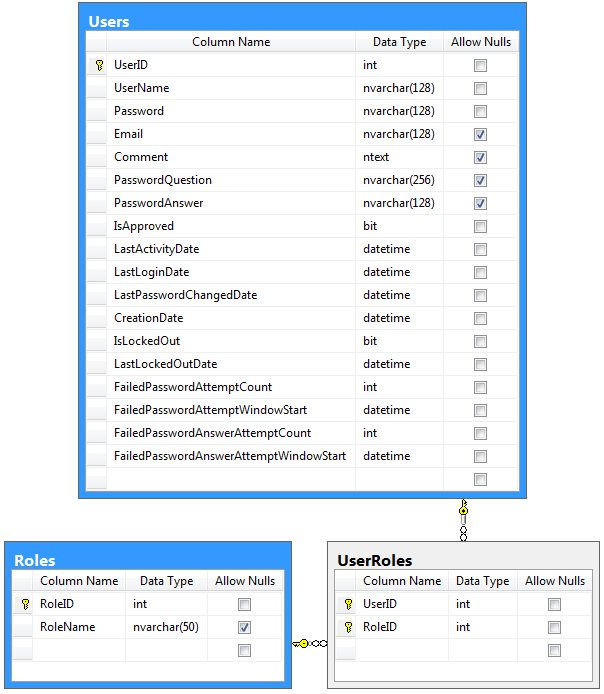
Advanced membership and role provider using identity primary keys.

SQL:

create table Users (
    UserID int identity not null primary key,
    UserName nvarchar(128) not null,
    Password nvarchar(128) not null,
    Email nvarchar(128),
    Comment ntext,
    PasswordQuestion nvarchar(256),
    PasswordAnswer nvarchar(128),
    IsApproved bit not null,
    LastActivityDate datetime not null,
    LastLoginDate datetime not null,
    LastPasswordChangedDate datetime not null,
    CreationDate datetime not null,
    IsLockedOut bit not null,
    LastLockedOutDate datetime not null,
    FailedPasswordAttemptCount int not null,
    FailedPasswordAttemptWindowStart datetime not null,
    FailedPasswordAnswerAttemptCount int not null,
    FailedPasswordAnswerAttemptWindowStart datetime not null
)
go

create table Roles (
   RoleID int identity not null primary key,
   RoleName nvarchar(50)
)
go

create table UserRoles (
    UserID int not null,
    RoleID int not null,
    primary key(UserID, RoleID)
)
go

alter table UserRoles with check add constraint FK_UserRoles_Roles 
foreign key (RoleID) references Roles (RoleID)

alter table UserRoles with check add constraint FK_UserRoles_Users 
foreign key (UserID) references Users (UserID)

These are the advanced membership and role provider tables with “unique identifier” primary keys.
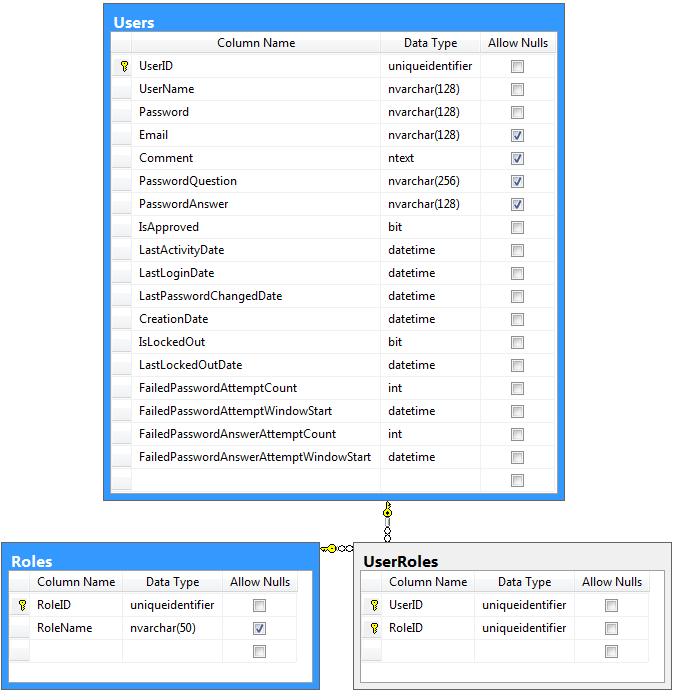
Advanced membership and role provider using unique identifier primary keys.

SQL:

create table Users (
    UserID uniqueidentifier not null default newid() primary key,
    UserName nvarchar(128) not null,
    Password nvarchar(128) not null,
    Email nvarchar(128),
    Comment ntext,
    PasswordQuestion nvarchar(256),
    PasswordAnswer nvarchar(128),
    IsApproved bit not null,
    LastActivityDate datetime not null,
    LastLoginDate datetime not null,
    LastPasswordChangedDate datetime not null,
    CreationDate datetime not null,
    IsLockedOut bit not null,
    LastLockedOutDate datetime not null,
    FailedPasswordAttemptCount int not null,
    FailedPasswordAttemptWindowStart datetime not null,
    FailedPasswordAnswerAttemptCount int not null,
    FailedPasswordAnswerAttemptWindowStart datetime not null
)
go

create table Roles (
   RoleID uniqueidentifier not null default newid() primary key,
   RoleName nvarchar(50)
)
go

create table UserRoles (
    UserID uniqueidentifier not null,
    RoleID uniqueidentifier not null,
    primary key(UserID, RoleID)
)
go

alter table UserRoles with check add constraint FK_UserRoles_Roles 
foreign key (RoleID) references Roles (RoleID)

alter table UserRoles with check add constraint FK_UserRoles_Users 
foreign key (UserID) references Users (UserID)

Configuration

Use one of the scripts above to create the membership and role provider tables in your database.

Start Code On Time web application generator, select the project name on the start page, and choose Settings. Select Authentication and Membership.

Select “Enable custom membership and role providers” option and enter the following configuration settings.

table Users = Users
column [int|uiid] UserID = UserID
column [text] UserName = UserName
column [text] Password = Password
column [text] Email = Email
column [text] Comment = Comment
column [text] PasswordQuestion = PasswordQuestion
column [text] PasswordAnswer = PasswordAnswer
column [bool] IsApproved = IsApproved
column [date] LastActivityDate = LastActivityDate
column [date] LastLoginDate = LastLoginDate
column [date] LastPasswordChangedDate = LastPasswordChangedDate
column [date] CreationDate = CreationDate
column [bool] IsLockedOut = IsLockedOut
column [date] LastLockedOutDate = LastLockedOutDate
column [int]  FailedPasswordAttemptCount = FailedPasswordAttemptCount
column [date] FailedPasswordAttemptWindowStart = FailedPasswordAttemptWindowStart
column [int]  FailedPasswordAnswerAttemptCount = FailedPasswordAnswerAttemptCount
column [date] FailedPasswordAnswerAttemptWindowStart = FailedPasswordAnswerAttemptWindowStart

table Roles = Roles
column [int|uiid] RoleID = RoleID
column [text] RoleName = RoleName

table UserRoles = UserRoles
column [int|uiid] UserID = UserID
column [int|uiid] RoleID =  RoleID

The configuration will guide the code generator in mapping the logical tables Users, Roles, and UserRoles to the physical tables in the database.

Generate the project to create the custom membership and role provider.

Monday, July 9, 2012PrintSubscribe
Overview of Commands

A command provides a developer-friendly dictionary of SQL expressions that correspond to the individual fields and also define the base table and joined tables. The application framework uses the command text elements to compose Select, Update, Insert, and Delete statements at run-time.

Command Properties:

Property Description
Controller Specifies the controller that the command belongs to.
Event Specifies which event that causes the command to execute.
Id Specifies the unique identifier for the command.
Table Name Specifies the table name to be used in automatically constructed Insert, Update, and Delete operations.
Text Specifies the text of the command.
Type Specifies the type of the command.

Learn how to work with commands in the Project Designer.

Learn to drag and drop commands in the Project Explorer.

Sunday, July 1, 2012PrintSubscribe
Drag and Drop, Cut/Copy/Paste, and More…

Code On Time release 6.0.0.29 includes enhancements to both code generation library and application design environment.

Generated web applications now support JavaScript Business Rules and Automatic Tracking of Selected Record. The Project Designer has been enhanced with drag & drop and cut/copy/paste  capabilities and offers “Navigate To” window that allows quickly locating project configuration elements.

The following features, enhancements, and bug fixes are included in this release:

  • Drag & drop and cut/copy/paste are support for pages, containers, data views, controls, user controls, controllers, and commands. Other project configuration elements will also be enhanced in the coming weeks.
     
  • The entire data controller can now be cloned.
     
  • Project Designer properties of menu configuration elements can be easily synchronized with Project Explorer.
     
  • Navigate To window allows quickly finding project configuration elements.
      
  • Code generator automatically combines all JavaScript files found in [Documents]\Code OnTime\Library\_Client\Scripts folder in a single _System.js file. The file is included in the generated web applications of all types.
     
  • Automatic Tracking of Selected Record is supported by the client library. Developers can take advantage of selected record synchronization.
     
  • New search option $autocompleteanywhere will cause the auto-complete to search anywhere in the field values. By default, the framework searches using "Begins With" operation, which generally performs better, but will not yield partial matches.
     
  • Data field property "Search Options" supports $disableautocomplete, $disablesamples, and $disablemultiplevalues options.
     
  • Modal form views now support dragging of the header.
     
  • View Details shows a modal view that will refresh the original source if changes are made.
     
  • "Hidden" fields will be displayed in summary if marked as "Show In Summary".
     
  • Master data sheet views automatically set focus on the first cell of the first row.
     
  • "Flat" actions will display the action description as a tooltip.
     
  • Implemented a fix for Import Processor to ensure that field values that are missing in import file are created to simulate as if the values were entered in the user interface form. Previous implementation has passed the non-blank values only. This makes it possible to implement UPSERT when importing data records.
     
  • Code On Time will now pre-process the designer logs before navigating to the data controller summary.
     
  • Localizer now takes into account the name of the module/webpart when caching the resource strings.
     
  • Project Explorer tab now feature "Home" button that shows List of Pages, List of Controllers, or List of User Controls.
     
  • The issue with the left border in AjaxControlToolkit tabs is fixed in all themes.
     
  • Sorting on fields with Format On Client = false will not cause a runtime exception.
     
  • Method Controller.UserInInRole is now creating an instance of ControllerUtility class to verify the user identity. This allows implementing custom role validation against SharePoint or DotNetNuke user groups.
     
  • ControllerDataSource will correctly perform Update/Insert/Delete operations when C#/VB business rules are associated with the data controller.
     
  • Component ControllerDataSource will use "=" filter operation if FilterParameter instance has its DBType property set to any value other than Object or String.
     
  • Aggregate fields are correctly formatted on the server when "Format On Client" property of a data field is set to "false".
     
  • It is possible to specify "about:blank" as the URL of top level pages without breaking the rendering of Advanced Menus.
     
  • Context Field Filters now support static filters in the both formats:
    FieldName = 12345 and FieldName='12345'
      
  • Decimal parameters are automatically initialized as Decimal(38,10) in SQL Business Rules and SQL action.
     
Continue to Where is my Stuff?