Web App Generator

Labels
AI(22) AJAX(112) App Studio(10) Apple(1) Application Builder(245) Application Factory(207) ASP.NET(95) ASP.NET 3.5(45) ASP.NET Code Generator(72) ASP.NET Membership(28) Azure(18) Barcode(2) Barcodes(3) BLOB(18) Business Rules(3) Business Rules/Logic(140) BYOD(13) Caching(2) Calendar(5) Charts(29) Cloud(14) Cloud On Time(2) Cloud On Time for Windows 7(2) Code Generator(54) Collaboration(11) command line(1) Conflict Detection(1) Content Management System(12) COT Tools for Excel(26) CRUD(1) Custom Actions(1) Data Aquarium Framework(122) Data Sheet(9) Data Sources(22) Database Lookups(50) Deployment(22) Designer(178) Device(1) Digital Workforce(3) DotNetNuke(12) EASE(20) Email(6) Features(101) Firebird(1) Form Builder(14) Globalization and Localization(6) HATEOAS(13) How To(1) Hypermedia(3) Inline Editing(1) Installation(5) JavaScript(20) Kiosk(1) Low Code(3) Mac(1) Many-To-Many(4) Maps(6) Master/Detail(36) Micro Ontology(5) Microservices(4) Mobile(63) Mode Builder(3) Model Builder(3) MySQL(10) Native Apps(5) News(18) OAuth(9) OAuth Scopes(1) OAuth2(14) Offline(20) Offline Apps(4) Offline Sync(5) Oracle(11) PKCE(2) Postgre SQL(1) PostgreSQL(2) PWA(2) QR codes(2) Rapid Application Development(5) Reading Pane(2) Release Notes(186) Reports(48) REST(29) RESTful(33) RESTful Workshop(14) RFID tags(1) SaaS(7) Security(81) SharePoint(12) SPA(5) SQL Anywhere(3) SQL Server(26) SSO(1) Stored Procedure(4) Teamwork(15) Tips and Tricks(87) Tools for Excel(3) Touch UI(93) Transactions(5) Tutorials(183) Universal Windows Platform(3) User Interface(337) Video Tutorial(37) Web 2.0(100) Web App Generator(101) Web Application Generator(607) Web Form Builder(40) Web.Config(9) Workflow(28)
Archive
Blog
Web App Generator
Friday, May 11, 2012PrintSubscribe
Feature: Multi-Level Master-Detail Pages

Master-detail relationships exist in all databases. For example, the Northwind database has a three-level master-detail relationship. Customers is referenced by Orders, and Orders is referenced by Order Details.

Customers, Orders, and Order Details table relationships in Northwind database

Code On Time web application generator automatically creates two-level master-detail pages. You can extend any master-detail page to have more relationship levels. An extended three-level master-detail page is shown below.

Three-Level Master-Detail page in Northwind web application.Three-Level Master-Detail page in Northwind web application.

Monday, April 23, 2012PrintSubscribe
SQL Business Rules, Modal Confirmation Forms

Code On Time release 6.0.0.25 introduces the following new features, enhancements, and bug fixes:

  • SQL Business Rules are now supported by the application framework in Premium and Unlimited editions. SQL Business Rules can be configured in the Project Designer or added directly to the application baseline. The tutorial will be available this week. Future releases will support Email and JavaScript business rules.
     
  • Modal confirmation dialogs are available in Premium and Unlimited editions. Confirmation data controllers can reference the context field values as 'Context_FIELD_NAME'. Context data row field values are passed as external filters. See the example demonstrating changing of a hidden foreign key with the help of a modal confirmation.
     
  • Action “Confirmation” property allows referencing field name in curly brackets to include the fields values of the current row in the confirmation message text.
     
  • If custom processing of "Report..." action has raised an exception in the business rules then this exception will stop report rendering. Previously the exception has been ignored resulting in a confusing error message.
     
  • Quick Find will not cause a runtime error when users enter values that can be converted to a System.DateTime instance less than 1/1/1753 and the backend is Microsoft SQL Server.
     
  • Multiple selection of data rows will cause a UI refresh delayed by 1 second.
     
  • SQL action will cause automatic refresh of child views if the data row is not in edit/new mode.
     
  • Class ActionResult provides method RefreshChildren that can be used in business rules to refresh the children of the data view that has caused execution of business rules.
     
  • Business Rules can assign a filter and sort expression when processing actions other than Select.
     
  • Fixed issues with the refresh after Delete or SQL actions. The selected key was not cleared correctly in the previous releases.
     
  • Action SQL will replace the Selected Key if any changes to the primary key fields are detected by the client library.
     
  • Added SetRoles and SetWriteRoles to node set plugins.
  • New virtualization node set plugins:
    1) NodeSet() will create an empty data controller node set
    2) SetItemsStyle, SetItemsAutoSelect, and other SetItemsPROPERTY_NAME methods allow configuring various aspects of a data controller.
     
  • Property baseViewId will not cause the cached data controller to remain editable. This was causing the problem virtualization node sets and annotations.
     
  • Method BusinessRules.JavaScriptString allows converting values to valid JavaScript strings with or without single quotes surrounding the text.
     
  • Designer allows reordering data controller fields using the context menu and up/down arrows on the action bar.
     
  • Client library will divide the numeric value by 100 if the data format string of the field is set to 'p' or 'P' and the '%' sign is not entered.
     
  • Category “Header Text” is not mandatory anymore.
     
  • Command ID in views is not mandatory anymore.
     
  • Data controllers without a command are now allowed.
     
  • Left padding added to search buttons in advanced search bar.
     
  • Lookup window bottom border is now drawn in the newer themes.
     
  • Fixed the bug with Lookup Field "Activate If Blank". All lookup fields with Activate If Blank will be displayed in sequence when entering a form.
Thursday, April 12, 2012PrintSubscribe
Interactive History of Recently Viewed Data

It is common for users in a line-of-business application to interact with the same data objects for extended periods of time. In this case, it may help to allow rapid switching between recently viewed objects. This capability can be enabled in the project settings of your Code On Time web application.

Start creating a sample Northwind web application. When you reach the Features page, switch to the Permalinks and History section using the box on the left side of the screen. Toggle the checkbox next to “Enable interactive history of most-recent data objects”.
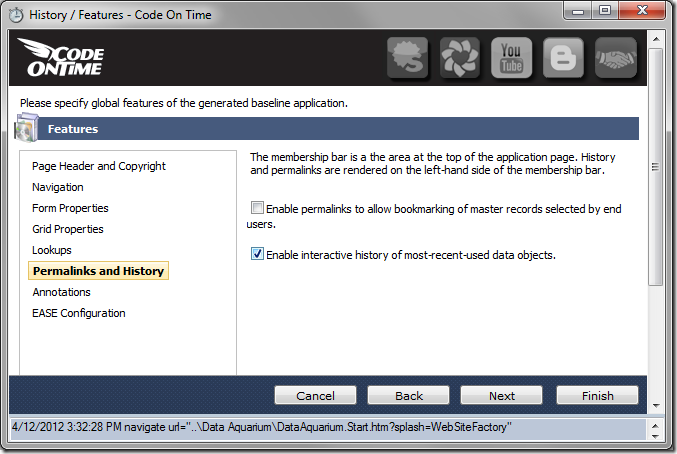
'Enable interactive history of most-recent-used data objects' option under 'Permalinks and History' of Code On Time Project Wizard

Continue through the wizard. On the Themes page, select Social theme.
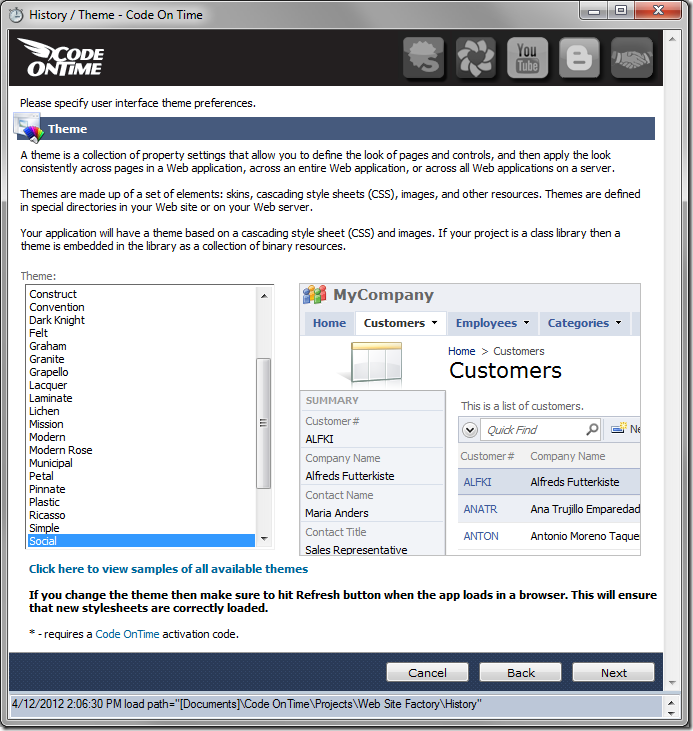
'Social' Theme selected in Code On Time Project Wizard

Finish configuring project settings and generate the application. When your default web browser opens, navigate to the Categories page. View several category records. Try viewing master records on other pages of the application. Any record that is displayed in the summary card on the left side of the page will be automatically added to the History of the current browsing session.

Next, click on the History link in the top left corner of the application.
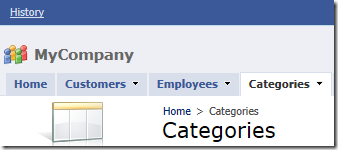
History link in Code On Time web application

An interactive display of summary cards will take up the screen. When you mouse over a card, it will be brought forward. You can click on the spyglass icon to cycle through the cards.
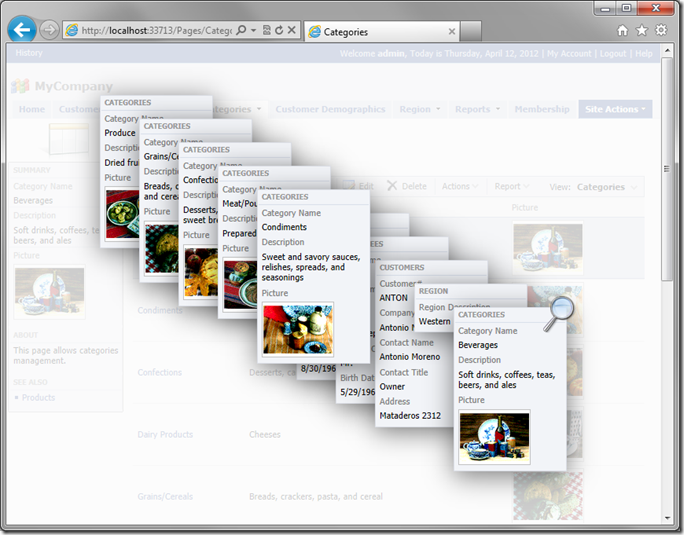
Interactive History in Code On Time web application

Click on any card to navigate directly to the record.
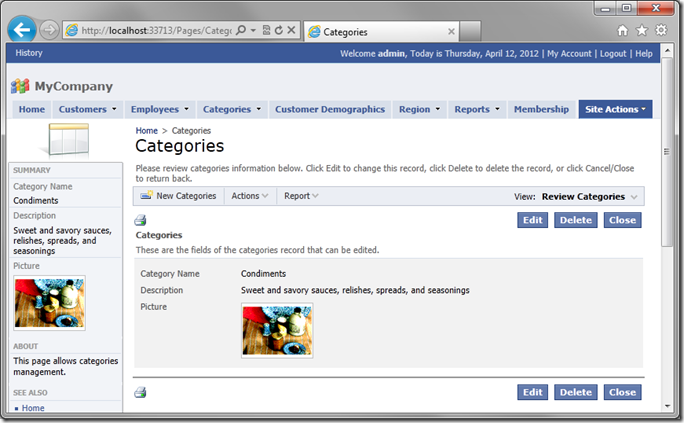
Selected record in Code On Time web application

You can also click on the white space in the background or press the Esc button on your keyboard to close the History.